Agilaire Customer Portal
A custom portal to distribute our software packages to customers while integrating with our CRM.
Overview
In order to improve our customer experience, we at Agilaire decided to revamp how we distribute our software to customers. To do this, I designed and built a new portal from the ground up that would give us complete control over every aspect of the system while still being intuitive for both customers and our employees.
Ideation
We initially started by looking to see if a pre-existing platform would satisfy our needs. Unfortunately, our software distribution is unique and the majority of pre-existing solutions required other kinds of buy-in (using it for all of our support, ticketing, etc.). Rather than switch our existing tools for something like ZenDesk, we decided to build the portal internally to ensure we had everything that we needed.
Choosing the Tools
I began by laying out all the application screens we needed, focusing on developing a consistent visual theme that would persist across the project. In tandem with this, I was outlining the architecture we would need to store these files, host the application, and managed user accounts. Based on our heavy use of .NET and pre-existing Azure resources, we decided to create the portal using ASP.NET Blazor and host the portal (and all its dependencies) in Azure. This included:
- Azure App Service to host the Blazor application for users to interact with.
- Azure Blob Storage to securely store and manage the software installer files.
- Microsoft Entra External ID (formerly Azure AD B2C) to store user accounts and manage sign-in flow.
- Azure SQL to store the backing database for the portal.
- Azure Functions to handle asynchronous jobs that can be done outside the portal.
While I was familiar with many of these things, my knowledge was mostly surface-level and this project offered me the opportunity to flesh out my understanding of Azure resource types and how to manage them. I spent much of the initial development phase testing these features in isolation so that once everything was put together it would take less time to set everything up.
Development
With a solid plan, I began development of the application. By far the hardest piece of the puzzle to figure out was the authentication using Entra External ID. You see, Entra External ID is a recent rebrand of Azure AD B2C and it still has some rough pieces to iron out. There simply isn’t as many examples using it when compared to the B2C library, which would be one thing if they had all the same functionality–but it doesn’t. More than that, there was a lot of manual connections I needed to make that felt like they were all over the place in the Azure Portal. Once I had the external tenant created, I had to jump around in Entra to register the application, set up authentication, create user secrets, and configure it so the app could actually authenticate a test user.
Once authentication was working, I began building the individual screens and the database incrementally, testing as I went. I utilized Entity Framework Core to map a set of C# classes onto tables in a local SQL Server DB. A bunch of quick iterations taught me a lot about Blob Storage and how to use it without making orphans of the files I uploaded. One of the helpful resources I used was the Fluent-UI icon library, a Microsoft-maintained repository of over 20,000 vector icons that I made use of heavily to denote important operations in the portal.
After all the pages were finished, I turned my focus to bugfixes and polishing. I trimmed the UI to be more clean and tried to test each page from the perspective of both a customer and an administrator. I also began development on the CI/CD pipeline for this project, using Bicep to deploy resources programmatically to Azure.
Results
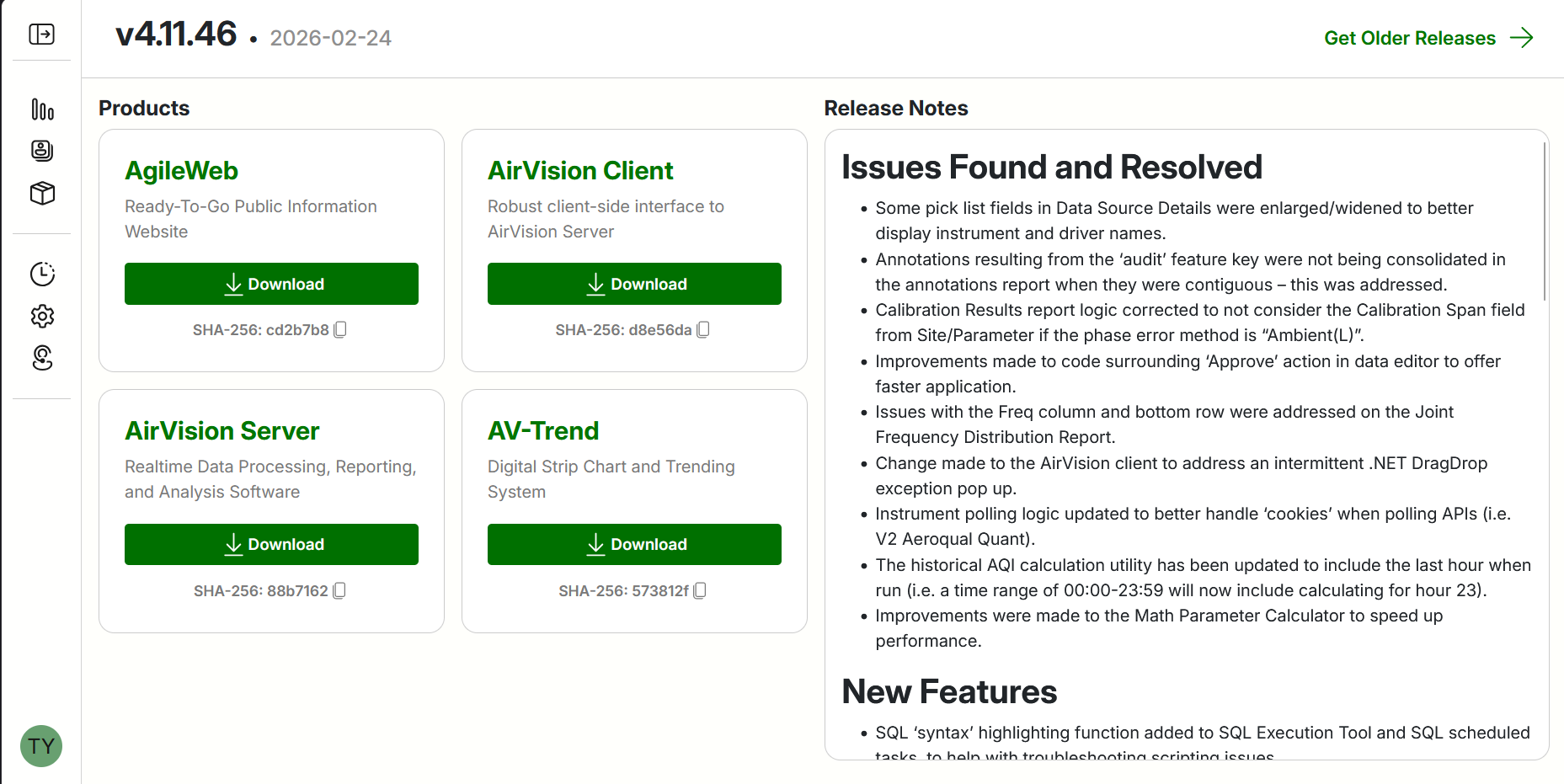
We were able to successfully create an alternative method for distributing our software. The original way, an FTP server, has many limitations that we fixed with this new method. We are now able to actually verify who downloads what and control what each customer has access to. The new system will serve all of our active clients and will be their way to download AirVision and any other software we offer. The portal was able to get finished on time, with it now in the hands of our employees to get it ready for customer use. This is still an ongoing project, so this post may be updated to better reflect the project as a whole. I’m very satisfied with how this came out and how much I learned when developing this project.
What I Learned
This project offered many opportunities to learn and test out technologies that I otherwise wouldn’t have used. Microsoft Entra is a very interesting tool, albeit difficult to use at times. I’ve never used an IAM tool like this before but am very interested to see what the other cloud providers offer. I found the portal difficult at times to navigate but that’s understandable, since I am not very well-versed in it. I also learned a lot about production-ready code. It needs to be made with security in mind, so that we don’t expose vulnerabilties. Logging is also key in production-ready code, with it being very helpful when we were trying to finally deploy the application. Monitoring the application is a whole different beast altogether. I’ve never managed an application of this size and I realize that nothing will replace the lessons learned with time. I’ve enabled Application Insights to log as much as possible and am learning how to setup alerts to trigger notifications. Some things will definitely slip through the cracks but as long as we keep an open mind, I’m sure we’ll set our selves up for future success!
Photos